
Why Security Matters
Your Rentvine account contains sensitive information about tenants, owners, and financial transactions. Protecting this data is critical to preventing
unauthorized access and malicious activity.
Use a Strong and Unique Password
- Always create a password that is long (12+ characters) and includes a mix of uppercase and lowercase letters, numbers, and special characters.
- Never reuse passwords from other websites. If a different site is compromised, reusing a password puts your Rentvine account at risk.
- Avoid easy-to-guess information (names, birthdays, pets, or simple words).
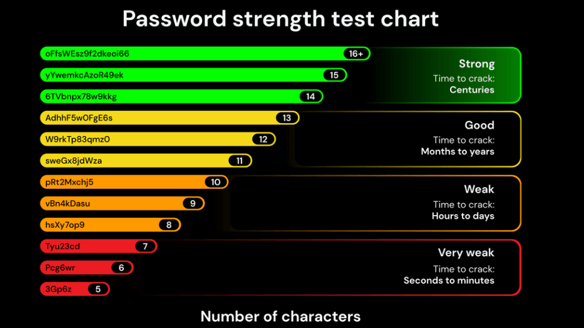
- Please note that the maximum amount of characters Rentvine allows for passwords is currently 35 characters.
Enable 2-Step Verification on Your Email Account
- To enhance the security of your Rentvine account, we strongly encourage you to enable Two-Factor Authentication (2FA) on the email account associated with your Rentvine username.
- Even if your password were compromised, this additional security step makes it far more difficult for someone else to get into your account.
- To get started, here are helpful direct MFA links for the most common providers:
- If you use a different email provider, please refer to their support documentation for instructions.
Treat MFA Codes with Caution
-
If you receive an MFA code you did not request, do not enter it. This may indicate someone else is trying to access your account.
- If you ever suspect unusual activity (unexpected MFA codes, logins you don’t recognize, or suspicious emails), contact Rentvine Support immediately.
- Prompt reporting allows us to secure your account and prevent potential data breaches.
-
Always confirm it’s you initiating the login or payment before using an MFA code.
Keep Your Devices Secure
Your Rentvine account is only as secure as the device you access it from.
-
Install regular updates for your computer, tablet, or smartphone.
-
Use antivirus and anti-malware software.
-
Lock your screen when stepping away from your device.
-
Avoid using public Wi-Fi without a secure VPN.
- Do not download or install software from unverified or unrelated sources. Random downloads can contain malware that exposes sensitive data.
⚠️ Rentvine will NEVER ask for your password, MFA code, or any credentials via email, text message, or phone call. If you receive a message asking for this information, treat it as fraudulent and contact support directly.
Be Alert to Phishing Attempts
Cybercriminals often try to trick users into giving away login credentials. Always be cautious of unexpected messages.
-
Do not click on suspicious links in emails or texts claiming to be from Rentvine.
- Rentvine will NEVER ask for your password by email or text.
-
Verify sender details before opening attachments.
-
If you ever receive a questionable message, contact Rentvine Support directly instead of replying or clicking.
-
Always Verify the URL Before Logging In
One of the most effective ways to avoid phishing attacks is to check the web address in your browser before entering your credentials.
- The only legitimate Rentvine login page is: https://account.rentvine.com
- Before typing your password, look at the address bar and confirm it matches exactly. Attackers register domains designed to look almost identical to the real thing, such as:
renttvine.com(extra letter)rentvine.it.com(extra words after the name)rentive-auth.logsistics.org.uk(unrelated domain impersonating Rentvine)
- If the URL looks even slightly off — do not enter your credentials. Close the tab and navigate directly to
https://account.rentvine.comby typing it into your browser. - If you arrived at a login page by clicking a link in an email, text message, or search result, take a moment to verify the URL before proceeding. When in doubt, go directly to the site instead of using the link.
What to Do If You Think You've Been Phished
If you believe you may have entered your Rentvine credentials on a site that wasn't the real Rentvine login page, act immediately — the sooner you respond, the better.
Step 1: Change your password right away
- Log in to
https://account.rentvine.comdirectly and change your password immediately. - Instructions: Click the user icon in the bottom left → My Profile → Change Password.
Step 2: Review your account users
- Go to your user management settings and check for any users you don't recognize.
- Revoke access for any unfamiliar accounts immediately.
Step 3: Contact Rentvine Support
- Notify us at
support@rentvine.comas soon as possible so we can review your account for unusual activity and assist with any additional steps. - Do not wait, prompt reporting helps us protect your account and prevent further damage.
Review User Roles and Permissions
In addition to securing your login credentials, we strongly recommend reviewing the roles assigned to your user accounts to ensure each user has only the minimum level of access necessary to perform their duties.
Limiting the number of users with full administrative access reduces the potential impact if any single account is ever compromised, the less access an attacker can gain, the less damage they can do.
A few minutes spent reviewing your user roles today could significantly limit your exposure in the event of a future incident.
Click here to learn more on how to create and manage user roles