
- This article goes over the Lease Custom Fields within the Property Manager Rentvine App.
This give you that ability to view custom field data on the go directly through the property manager app. - You can view and edit all of the custom field data associated with a lease whether that be gate codes, lockbox combinations, pet information, and any other fields your company has configured on the lease level, without needing to return to the desktop.
Viewing custom fields on a lease
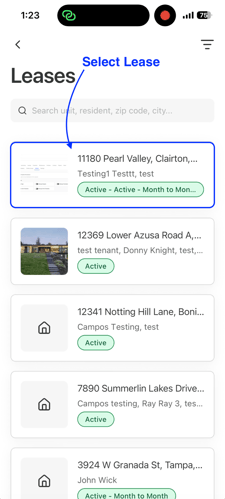
- Open the Lease Details screen for any lease.
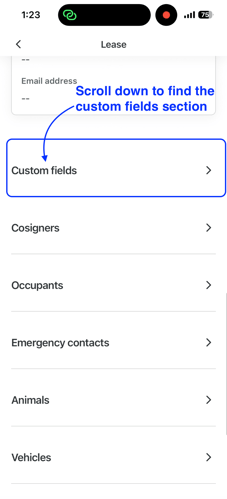
- If the lease has custom fields configured, a Custom Fields section will appear on the page.
- Tap Custom Fields to open the detail screen.
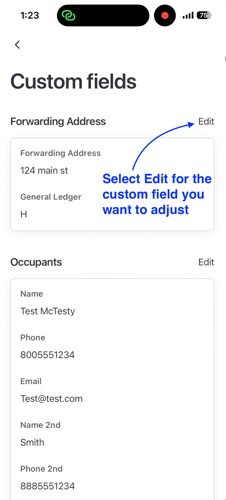
- All of your custom field categories are displayed, with each category's fields and their current values listed beneath it.
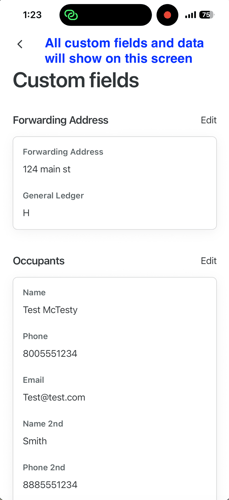
If no custom fields have been configured for a lease, the Custom Fields section will not appear.
Editing custom fields
Custom fields are organized by category, and you can edit all fields within a category at once.
- From the Custom Fields detail screen, find the category you want to update.
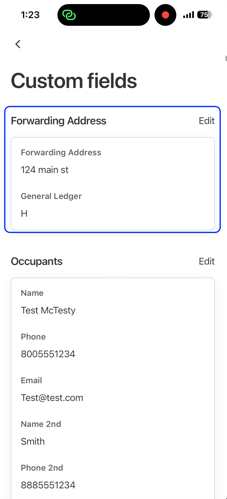
- Tap the Edit button next to the category name.
- Tap Save to apply your changes. Updates are reflected in the app immediately.
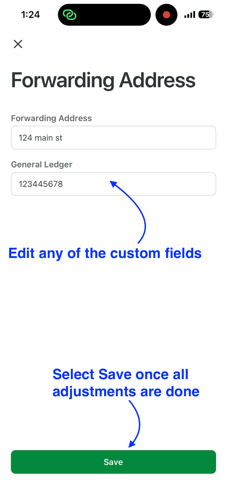
If you try to close the edit screen without saving, you'll be prompted to confirm before your changes are discarded.
Frequently asked questions
-
I don't see a Custom Fields section on a lease, where is it?
The section only appears if custom fields have been configured for that lease.
If you expect to see custom fields and don't, check the web platform to confirm fields are set up for that lease. -
Can I create or delete custom field categories from the mobile app?
No. Adding, removing, or configuring custom field categories and definitions is done on the Rentvine web platform.
The mobile app supports viewing and editing these custom fields only. -
Are the changes I make in the app reflected on the web platform?
Yes. Any edits you save in the mobile app are updated in real time and will be visible on the web platform immediately. -
What if the app can't load my custom fields?
If there's a connection issue, an error will appear within the Custom Fields section.
The rest of the Lease Details screen will remain fully functional.